Plate Lookup
- 4.4
- Rating
- 50.00K
- Installs
- Free
- Price

 Analysis by App-foxy
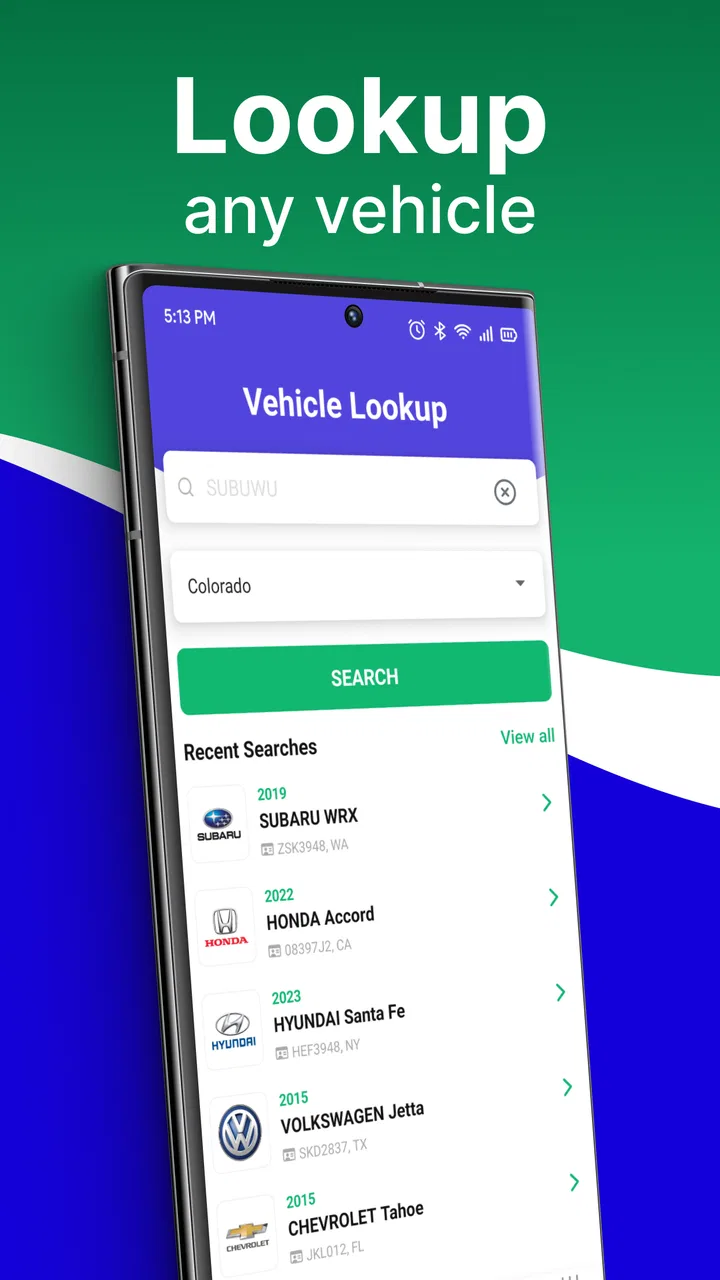
I spent time with Plate Lookup as a practical vehicle-research tool rather than treating it like a simple search box. It belongs to the Auto & Vehicles category and is developed by PlateLookup.app. The basic idea is straightforward: enter a license plate or VIN and use the resulting vehicle history and owner-data information as one piece of a larger decision. That makes it potentially useful when I am checking a used car, trying to organize information after a parking incident, or simply wanting more context before contacting a seller.
My first impression was that the app is aimed at people who want a focused lookup instead of a broad automotive database. It is free to install, rated for Everyone, and currently sits at version 6.3.0, with support for Android 8.0 and later. Its average rating is 4.3 from around 1.1 thousand ratings, and it has passed 50 thousand installs. Those figures suggest a reasonably established audience, but they do not remove the need to read each result carefully. A plate or VIN search can be helpful; it should not be mistaken for a complete inspection or a guarantee about a vehicle.
How clearly the app supports different users
I look at accessibility here through the practical task the app is built around: turning a plate or VIN into vehicle information. That focused route can suit people who prefer one clear purpose over a crowded automotive app, while identifier entry and reading results may still call for adjustments or a helper. The next section considers how those differences show up in everyday use.
You May Also Like

 Google Keep - Notes and lists
Google Keep’s Quiet Growth Shows the Appeal of Simpler Notes
As mobile work gets busier, Google Keep keeps winning a simple contest: capture a thought quickly, find it later, and get on with the day.

 Blood Strike: 2.5 Anniversary
Blood Strike’s Loadouts Turn Every Drop Into a Tactical Gamble
A close look at Blood Strike’s custom loadouts: how fast access to signature weapons reshapes its battle royale rhythm, rewards preparation, and narrows the gap between fights.

 Pandora - Music & Podcasts
Pandora’s Music Is Easy to Start, but Harder to Recover
Pandora’s strength is its low-effort path from a seed to a station. Its weak spot is how much confidence it asks you to place in connection, setup, and quiet recovery.

 8 Ball Pool
 Is Built on Rivalries, Rematches, and Routine
A close look at the rivalries, rematches, shared routines, and unanswered safety questions that turn a quick pool match into a persistent mobile community.

 Samsung Music
’s Quiet Strength Is Playing What You Already Own
Its reach comes less from spectacle than from dependable access to a personal library. That simplicity is both the app’s strongest retention engine and its ceiling.

 AccuWeather: Weather Radar
AccuWeather Review: A Quick, Clear Forecast for Everyday Decisions
For everyday plans, the best forecast is the one you can understand quickly. AccuWeather makes rain timing, radar, and local conditions easy to act on, with a few trade-offs.
More From Our News Desk



Readability and navigation during a lookup
The strongest part of this kind of app is the narrow purpose. I do not have to move through a large collection of automotive tools before reaching the main task. The workflow naturally divides into two choices: search with a license plate when that is what I have, or use a VIN when I need to work from the vehicle identification number. That distinction matters because people often receive only one of those details from a seller, a parking notice, or a photograph.
For someone who prefers direct, uncluttered tasks, this focus is useful. I can decide what information I have first and then choose the matching route instead of trying to guess which database or report category applies. The app’s short name and narrow purpose also make it easier to remember when I need it later, especially compared with general vehicle marketplaces that mix listings, financing, messages, and inspection content.
There is an important readability habit I would recommend: do not skim the first visible result and immediately treat it as the answer. Vehicle records contain details that need context. I would pause after a search, compare the identifying information with the actual car, and note anything that does not line up. This is particularly important when a plate has been entered incorrectly or when a seller has supplied a VIN from a different vehicle.
People with reduced vision may find a text-based lookup easier than an image-heavy vehicle marketplace, because the central task is entering and reviewing information rather than judging photographs. At the same time, I would not assume that every result is equally easy to read for every person. Long identifiers, dense history details, and small interface controls can create fatigue. Increasing the device’s text size, using display magnification, or turning on a screen reader can make the process more manageable, although the practical experience will depend on how the app presents its controls and results on a particular phone.
The app is also a reasonable fit for users who process information better in a step-by-step order. I would prepare the identifier before opening the search, enter it slowly, and review the returned vehicle data before moving on. That approach reduces the mental load of switching between the seller’s message, a photograph of the plate, and the app. It also makes errors easier to spot than rapidly entering several searches one after another.
Motor and sensory considerations in real use
Typing a VIN is more demanding than entering a short plate number. A VIN combines letters and numbers, so a person with hand tremors, limited dexterity, or difficulty distinguishing similar characters may find manual entry frustrating. My practical workaround is to copy the identifier from a reliable digital source when possible, rather than retyping it from a distant photograph. If copying is not available, I would enlarge the image, enter a few characters at a time, and compare the completed entry with the original before searching.
Plate searches can be less demanding when the plate is visible and short, but they still create problems in poor lighting, rain, glare, or crowded parking areas. A person with low vision may need another person to read the plate, while someone with color-vision differences may struggle if the only clue is a colored design or background. In those situations, the app cannot replace a clear identifier. The best accessibility improvement may happen before the app opens: ask for the characters in plain text instead of relying on a photograph.
Motor accessibility also depends on the surrounding situation. Holding a phone with one hand while standing beside a road is not a comfortable workflow for everyone. I would avoid trying to complete a lookup while walking, driving, or balancing the phone in an awkward position. If I needed to use the app at a dealership, I would sit down, keep the vehicle information in front of me, and complete one careful search rather than rushing through several entries.
For users who are sensitive to visual clutter or who become overwhelmed by too many choices, the focused purpose is an advantage. There is less need to interpret unrelated automotive content. However, a person who relies heavily on spoken feedback should test whether the phone’s accessibility tools read the search controls and returned information in a useful order. I would not describe the app as universally accessible simply because the task is simple. A simple task can still become difficult when identifiers are lengthy or when important results are presented in a dense format.
Situational access: when the app is genuinely useful
The most convincing everyday scenario is a used-car check before spending time on a viewing. Imagine I find a vehicle advertised privately and receive its plate number before arranging a meeting. I can use the plate lookup to gather an initial picture, then ask the seller direct questions about anything that deserves explanation. If the seller later provides the VIN, I would run that separately and compare the vehicle identity rather than assuming the first lookup is enough.
That two-stage workflow is one of the more useful ways to approach the app. A plate is convenient when I am still deciding whether a vehicle is worth seeing. A VIN is more appropriate when I am examining a specific car and want to make sure the records relate to that exact vehicle. Using both identifiers, when available, creates a basic cross-check. It does not turn the app into an inspection service, but it can help me avoid relying on a single incomplete clue.
Another scenario is a parking-lot incident. If I need to record information about another vehicle, a plate lookup may help me organize what I know before speaking with an insurer, property manager, or law-enforcement agency. I would treat the result as supporting information, not as permission to confront someone or publish personal details. The responsible workflow is to record the time and location separately, preserve any legitimate evidence, and use official channels for an incident report.
The app may also help a family member who is less comfortable with automotive terminology. I could perform the initial search with them, explain the difference between a plate and a VIN, and mark questions to ask the seller. That makes the tool useful beyond individual car enthusiasts. It can serve as a shared checklist during a purchase, especially when one person handles the technology and another evaluates the vehicle in person.
For users with limited data access or unreliable connectivity, I would plan the lookup before arriving at a remote viewing location. A search performed in a dealership or seller’s driveway may be less convenient if the phone connection is weak. I would save the identifier in a secure note beforehand and avoid depending on a last-minute photograph. This is not a special feature of the app; it is a practical way to reduce pressure when the surrounding environment is already difficult.
What it does better than common alternatives
Compared with searching the open web, Plate Lookup offers a more direct starting point for vehicle identification. A general search engine can return scattered pages, advertisements, forum discussions, and unrelated results. This app is more suitable when my question begins with a plate or VIN and I want to stay focused on vehicle history and owner-data information.
Compared with a vehicle marketplace, it is less useful for comparing prices, contacting multiple sellers, or browsing photographs. I would use a marketplace to find candidates and this app to investigate a candidate, not expect one to replace the other. Compared with asking a mechanic, the app can help me prepare questions before an inspection, but it cannot provide the hands-on judgment that comes from examining the engine, body, tires, electronics, and paperwork.
There is also a privacy and judgment difference between a structured lookup and casual online searching. Because owner data may be sensitive, I would keep the purpose narrow and avoid using the app to investigate people out of curiosity. A vehicle record should support a legitimate automotive or incident-related need. Even when information appears in a result, that does not make it appropriate to share publicly or use to pressure another person.
Remaining barriers and sensible limits
The first barrier is identifier quality. A wrong character can lead to a confusing result or a search that fails, and the app cannot correct a plate or VIN that I copied incorrectly. Characters that look alike are especially troublesome when reading a photograph. I would verify every character before drawing conclusions, and I would ask the source to resend the identifier in text if the image is unclear.
The second barrier is interpretation. A history result is not the same as a mechanical diagnosis, legal opinion, or promise that a car is safe. Someone who is new to buying vehicles may see a clean-looking result and stop investigating too early. My preferred sequence is lookup, questions for the seller, independent inspection, and review of the title and purchase documents. The app is valuable in that sequence, but it should not be the final step.
The third barrier is cost at the point of deeper use. The app is free to install, while in-app purchases range from $7.99 to $49.99 per item. That makes it important to understand what I am about to pay for before confirming anything. A casual user checking one vehicle may not want to commit to a higher-priced item, while a serious buyer may consider a paid report worthwhile if it answers a specific question. I would decide the maximum amount I am willing to spend before starting, rather than making that decision under pressure from a seller or a time-limited viewing.
That payment structure can also affect users with limited budgets or people who need a support person to help them make purchasing decisions. I would explain the possible cost in advance and ask whether the lookup is necessary for the decision at hand. If the vehicle already has unclear paperwork, an independent inspection or official record check may be a better use of money than repeatedly ordering app-based reports.
Another limitation is that owner-data information requires restraint. I would not use a result to identify, contact, or track a private individual. If the purpose is a collision, trespassing concern, or other serious incident, official authorities are the right route. The app can help me organize vehicle information, but it should not become a substitute for due process or a reason to expose someone’s personal details.
Users who need extensive spoken navigation, high-contrast presentation, or very large controls should test the actual interface on their own device before depending on it. The app supports Android 8.0 and later, which covers a wide range of phones, but operating-system support alone does not tell me how comfortable the screen will be for a particular person. I would use the phone’s accessibility settings, keep the device stable, and have a second person assist with reading or entering identifiers when needed.
Who should use it, and who should choose something else
I would recommend Plate Lookup to a used-car shopper who wants a focused first check before arranging an inspection. It is also a sensible tool for someone who regularly handles vehicle paperwork, manages a small collection of cars, or needs a quick way to organize information after a parking-related incident. Its plate-and-VIN approach makes it more relevant to those tasks than a general automotive browsing app.
I would be more cautious about recommending it to a person who expects a complete buying decision from one search. If the goal is a detailed mechanical assessment, a formal title investigation, insurance guidance, or legal advice, a mechanic, government service, insurer, or qualified professional is the better choice. Someone who dislikes entering long identifiers may also prefer to ask a seller or dealer for a complete report and supporting documents instead of relying on manual lookup.
For a buyer with accessibility needs, I see the app as potentially useful but best used with a deliberate setup. Prepare the identifier in text, enlarge the display, work in a quiet and stable place, and involve a trusted helper if reading or typing becomes tiring. Those steps make the tool more inclusive without pretending that the app itself solves every vision, motor, hearing, cognitive, or situational barrier.
My inclusive verdict
After using it as a focused research aid, I see Plate Lookup as a practical middle step between finding a vehicle and committing to a purchase. It is easier to approach than a broad web search when I already have a plate or VIN, and it can give me useful questions to carry into a conversation with a seller or inspector. The cleanest experience comes from careful preparation rather than hurried searching in a noisy parking lot.
Its limitations are just as important as its convenience. Long identifiers can be difficult to enter, results need interpretation, deeper reports may involve in-app purchases, and owner-data information should be handled responsibly. The app is not the right tool for every automotive question, and it should never replace an inspection or official process.
Still, for a free Auto & Vehicles app from PlateLookup.app, the focused workflow is appealing. I would keep it available for preliminary checks, use plate searches early, use VIN searches when I can verify the exact vehicle, and treat every result as evidence to examine rather than a final verdict. The best way to use it is as a careful starting point, not as permission to stop asking questions.
That balance is also what makes it most useful for different abilities and contexts. With larger text, a stable workspace, copied identifiers, and help when needed, many users can make the lookup less tiring and more reliable. People who need official, professional, or fully hands-on vehicle assessment should look elsewhere for the final answer, but anyone wanting a focused first pass may find Plate Lookup a worthwhile addition to a responsible car-buying routine.
FAQs for Plate Lookup
01What is Plate Lookup and how does it work?
Plate Lookup is a versatile application designed to provide detailed information about vehicles using their license plate numbers. By inputting a plate number, users can access data such as vehicle history, registration details, and sometimes even owner information, depending on the jurisdiction and available data sources.
02Is Plate Lookup free to use or are there any charges involved?
Plate Lookup offers both free and premium features. Basic searches may be free, providing limited information. For comprehensive data, such as full vehicle history, accident reports, or ownership details, a small fee might be required. Users can choose a subscription or pay-per-use model depending on their needs.
03How accurate is the information provided by Plate Lookup?
The accuracy of the information on Plate Lookup largely depends on the data sources it accesses. The app uses official databases, and while it strives for accuracy, there can be discrepancies based on data updates and regional differences. Users should verify critical information independently when necessary.
04Is it legal to use Plate Lookup in my area?
The legality of using Plate Lookup varies by region. In some areas, accessing vehicle information through license plates is permitted for personal use, while in others, it might be restricted. It's important to check local laws and regulations before using the app to ensure compliance with privacy laws.
05What platforms is Plate Lookup available on, and how user-friendly is it?
Plate Lookup is available on both Android and iOS platforms, providing a seamless experience across devices. The app features an intuitive interface with easy navigation, making it user-friendly for both tech-savvy individuals and those less familiar with mobile applications. Regular updates ensure smooth functionality and the latest features.
Pros
- User-friendly interface for quick searches.
- Supports multiple vehicle types.
- Accurate and up-to-date information.
- Fast processing of search results.
- Minimal data usage for efficiency.
Cons
- Limited to certain regions.
- Requires a stable internet connection.
- Ads can be intrusive at times.
- Some features behind a paywall.
- Occasional app crashes reported.

Plate Lookup
Gallery